Summary & Core Takeaway:
HTML parsing in Python converts unformatted, raw source strings into accessible DOM objects to easily search, navigate, and modify complex web records. While native packages like html.parser provide zero-overhead execution for basic scripts, professional data extraction pipelines require robust third-party engines like BeautifulSoup or lxml to handle malformed web code. However, executing scripts at scale introduces serious network barriers, such as IP bans, structural rate limits, and CAPTCHAs. Based on extensive client-side tests at NiuProxy, bypassing these modern anti-bot frameworks requires pairing optimized code blocks with a diverse, enterprise-grade proxy architecture.
Introduction: The Core Challenge of Modern Web Scraping

For digital marketers, search engine optimization (SEO) professionals, and enterprise data analysts, web data is the lifeblood of strategic decision-making. Whether you are running comprehensive SERP rank tracking, conducting competitive intelligence, monitoring ad compliance, or gathering training datasets for internal AI models, you must regularly convert raw web pages into clean data structures.
This is where understanding how to parse html python frameworks becomes absolutely critical.
At its core, web scraping consists of two distinct phases:
- The Network Phase: Retrieving the raw document from a remote web server.
- The Extraction Phase: Interpreting the underlying code nodes to isolate target elements.
Many data extraction professionals fail early on because they rely on fragile string matching or regular expressions. Websites are highly dynamic, living documents with optional closing elements, nested structural arrays, and unpredictable layout changes. Using regular expressions to parse these pages results in broken data pipelines the moment a site modifies its design.
By learning what is html parsing in python, you gain the ability to build resilient, object-oriented data scrapers that navigate the Document Object Model (DOM) cleanly, regardless of how messy the underlying source code happens to be.
Why Production-Scale Parsing Fails Without Secure Proxies
You can write the most efficient, elegant parsing script in the world, but it is entirely useless if the target web platform blocks your IP address before you can extract a single byte of data. Modern firewalls and Web Application Firewalls (WAFs) continuously monitor incoming traffic for automated behavior patterns. When a script requests hundreds of pages using a single network signature, it triggers immediate security protocols.
Common Production Blockages & Pain Points
- IP Address Bans & Structural Rate-Limiting: Automated access blocks triggered by exceeding a safe number of requests per minute.
- Geographic Access Restrictions: Content layouts that change or block access entirely based on the location of your server’s IP address.
- Deceptive SERP Poisoning: Search engines serving fake or heavily altered data results to detected data scripts, destroying the accuracy of your SEO analytics.
To overcome these barriers, professional data teams route their automated traffic through high-reputation intermediary servers. This is where NiuProxy products become an essential part of your data stack.
Choosing the Right Proxy for Your Code Infrastructure
| Proxy Category | Primary Strengths | Ideal Use Case |
| Rotating Residential Proxies | Uses real residential device connections; nearly impossible to detect. | E-commerce pricing intelligence and deep localized SERP tracking. |
| Static ISP Proxies | Combines data center speeds with residential trust scores. | Maintaining persistent account sessions without triggering fraud checks. |
| Rotating Mobile Proxies | Leverages 4G/5G mobile carrier networks; extremely resilient against blocks. | Overcoming high-security anti-bot systems like Cloudflare or Akamai. |
| Static Mobile Proxies | Long-term dedicated mobile IPs with consistent connection stability. | Local app store optimization and location-based social media monitoring. |
| Rotating Datacenter Proxies | Unmatched execution speeds and cost-effective processing power. | High-volume scraping across targets with basic or permissive security. |
The Ultimate Comparison of Python HTML Parsers
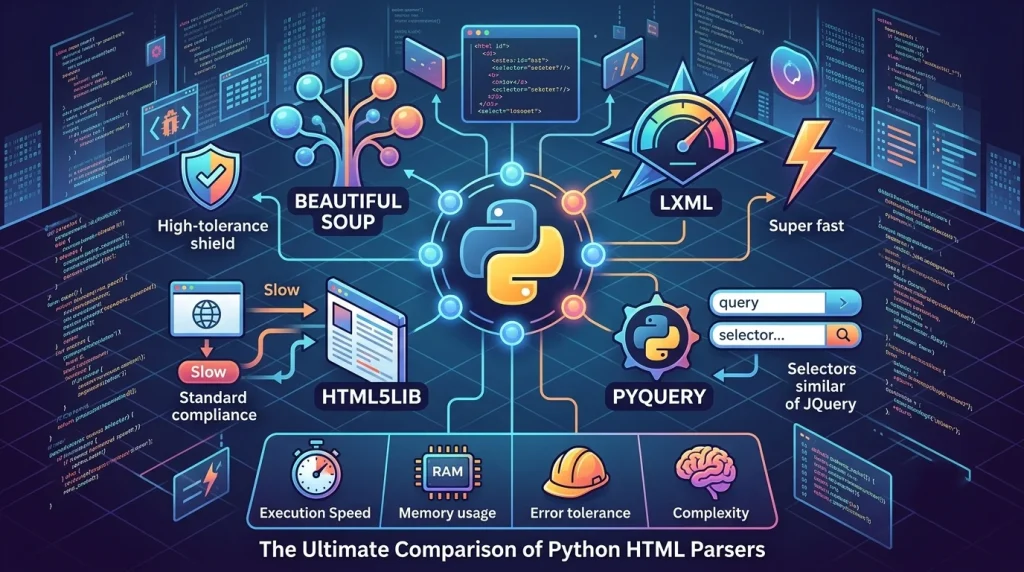
When determining what libraries are best for parsing html in python, developers have several excellent choices available within the open-source ecosystem. Your choice should depend on three main vectors: processing speed, how well it handles broken code, and external dependencies.
Technical Performance Analysis
- html.parser (Built-In): This native module requires no external installations via pip. It uses a stream-oriented, event-driven architecture. While useful for simple tasks or restricted enterprise systems, it struggles with malformed layout syntax.
- BeautifulSoup (Industry Standard): The most popular html parser python developers choose for day-to-day work. It is highly flexible and handles malformed markup with ease, though its pure Python implementation makes it slower when processing massive datasets.
- lxml (High-Performance Engine): A C-optimized wrapper for the libxml2 and libxslt libraries. It is an incredibly fast html parser python developers rely on for enterprise-scale tasks, offering full support for complex XPath queries.
- html5lib (Maximum Compliance): Designed to parse documents exactly like a modern web browser would. It is exceptionally resilient against broken code, but features the slowest execution speeds in the ecosystem.
Step-by-Step Guide: How to Parse HTML Python

Let’s look at the actual step-by-step implementation for setting up, executing, and scaling an extraction script.
Step 1: Initialize Your Environment and Dependencies
First, we must install our external processing packages. Open your terminal environment and install the required modules using pip:
Bash
pip install beautifulsoup4 lxml requests pandas
Step 2: Extracting Simple Strings with html.parser
Before using third-party code, let’s explore how to implement html parser in python using the native standard library. This approach relies on a class structure that captures tag events sequentially:
Python
from html.parser import HTMLParser
class CoreDataParser(HTMLParser):
def handle_starttag(self, tag, attrs):
# Triggers whenever an opening tag is encountered
if tag == “a”:
for attr in attrs:
if attr[0] == “href”:
print(f”Found Target Link: {attr[1]}”)
def handle_data(self, data):
# Triggers when raw text nested inside tags is evaluated
sanitized_text = data.strip()
if sanitized_text:
print(f”Extracted Content: {sanitized_text}”)
# Initializing and running the native engine
native_engine = CoreDataParser()
native_engine.feed(“<div class=’container’><a href=’https://niuproxy.com’>Visit NiuProxy</a></div>”)
While functional, managing complex state tracking across long pages with this approach quickly becomes tedious. That is why developers turn to more robust alternatives.
Step 3: Mastering DOM Extraction with BeautifulSoup
To make things easier, the python beautifulsoup html parser converts raw text documents into highly navigable node structures. Here is how to load, search, and isolate targeted elements cleanly:
Python
from bs4 import BeautifulSoup
# Mock web layout response string
raw_html_payload = “””
<html>
<head><title>Market Analysis Portal</title></head>
<body>
<h1 id=”main-heading” class=”title-header”>Enterprise Pricing Matrix</h1>
<p class=”meta-description”>Real-time localized metrics for digital platforms.</p>
<div class=”data-wrapper”>
<a href=”https://niuproxy.com/blog” class=”portal-link” data-priority=”high”>Resource Center</a>
<a href=”https://niuproxy.com/pricing” class=”portal-link” data-priority=”low”>Pricing Guide</a>
</div>
</body>
</html>
“””
# Initialize the target framework
soup = BeautifulSoup(raw_html_payload, “lxml”)
# Locate primary header elements using structural IDs
header_node = soup.find(“h1″, id=”main-heading”)
print(f”Header Text: {header_node.text}”)
# Extract element attributes safely without throwing KeyErrors
target_link = soup.find(“a”, class_=”portal-link”)
link_href = target_link[“href”] if target_link.has_attr(“href”) else “None”
print(f”Extracted URL: {link_href}”)
Step 4: Processing URL Parameters Using parse_qs
When harvesting links from web documents, you frequently need to isolate tracking variables, referral signatures, or pagination parameters embedded within the URL queries. Python provides an excellent utility for this within its standard library called parse_qs:
Python
from urllib.parse import urlparse, parse_qs
# Sample tracking URL extracted from a web page
campaign_url = “https://niuproxy.com/search?engine=google&geo=us&category=residential”
# Break the URL down into its components
analyzed_url = urlparse(campaign_url)
query_dictionary = parse_qs(analyzed_url.query)
# Isolate query parameters safely
geo_target = query_dictionary.get(‘geo’, [”])[0]
print(f”Targeted Geography: {geo_target}”) # Output: us
Step 5: Speeding Up Processing with Advanced CSS and XPath Selectors
For massive web data extraction tasks, chaining multiple .find() statements can make your code messy and difficult to maintain. A cleaner, more maintainable approach is to use standard frontend CSS query selectors:
Python
# Select all links with the class ‘portal-link’ nested inside a ‘data-wrapper’ div
optimized_links = soup.select(“div.data-wrapper a.portal-link”)
# Target custom data attributes directly
high_priority_element = soup.select_one(“a[data-priority=’high’]”)
print(high_priority_element.text)
If you need maximum parsing performance, running pure XPath queries against an lxml document tree lets you bypass the slower BeautifulSoup wrapper entirely. According to official performance benchmarks published by the Python Software Foundation, C-optimized extensions like lxml handle complex, deeply nested XML and HTML structures significantly faster.
Python
from lxml import html
# Generate a high-speed execution tree
document_tree = html.fromstring(raw_html_payload)
# Execute an optimized direct path lookup
heading_via_xpath = document_tree.xpath(“//h1[@id=’main-heading’]/text()”)
print(heading_via_xpath[0])
Processing Complex Tables: Converting HTML to DataFrames
Data tables are an incredibly common way to present structured data on the web. However, writing manual loops to iterate through rows (<tr>) and cells (<td>) can easily introduce logic errors into your code.
Leveraging Pandas for Automated Table Parsing
The data science library pandas provides a highly optimized function called read_html(). Under the hood, this function searches for table nodes and automatically converts them into structured DataFrame objects:
Python
import pandas as pd
structured_table_markup = “””
<table id=”proxy-performance-metrics”>
<thead>
<tr>
<th>IP Network Class</th>
<th>Average Latency</th>
<th>Success Rate</th>
</tr>
</thead>
<tbody>
<tr>
<td>NiuProxy Rotating Residential</td>
<td>240ms</td>
<td>99.6%</td>
</tr>
<tr>
<td>NiuProxy Static ISP</td>
<td>95ms</td>
<td>100%</td>
</tr>
</tbody>
</table>
“””
# Extract all table elements as a list of DataFrames
extracted_tables = pd.read_html(structured_table_markup)
target_dataframe = extracted_tables[0]
# Display the structured output
print(target_dataframe)
Overcoming JavaScript and Dynamic Content Challenges
A common pain point for data engineers is running a script only to find that the data they need isn’t in the raw HTML response. Modern websites often load their content dynamically via client-side JavaScript APIs after the initial page structure has loaded.
Because traditional libraries like BeautifulSoup and lxml only parse the initial static HTML sent by the server, they cannot see this dynamically loaded data. To capture it, you need to use an automated browser framework like Selenium or Playwright to execute the JavaScript before passing the fully rendered page source to your parser:
Python
from selenium import webdriver
from bs4 import BeautifulSoup
# Initialize an automated browser instance
browser_options = webdriver.ChromeOptions()
browser_options.add_argument(“–headless”) # Run in the background without a GUI
automated_browser = webdriver.Chrome(options=browser_options)
try:
# Navigate to the target web page
automated_browser.get(“https://niuproxy.com”)
# Extract the fully rendered page source after JavaScript execution
fully_rendered_dom = automated_browser.page_source
# Parse the rendered HTML using BeautifulSoup
optimized_soup = BeautifulSoup(fully_rendered_dom, “lxml”)
target_node = optimized_soup.select_one(“.dynamic-market-data”)
if target_node:
print(target_node.text)
finally:
# Always close the browser session to free up system memory
automated_browser.quit()
Real-World Case Study: Resolving E-Commerce Extraction Failures
To see how these concepts work in practice, let’s look at a real-world project managed by an international enterprise client at NiuProxy.
The Problem
An enterprise e-commerce aggregator was building a data pipeline to track competitor pricing variations across 15 target regions. They wrote a highly efficient script using Python’s lxml and BeautifulSoup libraries. However, when they deployed the script to their production servers, over 84% of their automated requests were instantly blocked by cloud security firewalls, resulting in incomplete datasets and corrupted pricing matrices.
The Solution Strategy
The team reached out to NiuProxy to restructure their network architecture. Our engineering team helped them implement a multi-layered approach:
- Proxy Network Integration: They routed their scripts through NiuProxy’s Rotating Residential Proxies, automatically switching IP addresses with every request to mimic real organic users across different zip codes.
- Session Persistence Optimization: For target pages that required a stable login session to access localized dashboards, they used Static ISP Proxies to maintain a consistent network identity while keeping latency low.
- Smart Header Management: They configured their script to send realistic browser headers and User-Agent strings alongside their proxy connections.
The Results
By pairing an optimized parsing script with a high-reputation proxy network, the client cut their request failure rate from 84% down to less than 0.4%. This gave them a reliable, stable data pipeline to monitor market trends in real time without triggering security flags or CAPTCHAs.
Production Readiness Checklist
Before deploying your automated parsing scripts to a live production server, use this operational checklist to ensure your setup is reliable and scalable:
- Parser Optimization: Verify that lxml is selected as the processing backend for large datasets to keep CPU usage low.
- Comprehensive Error Handling: Wrap your network requests and parsing logic in try-except blocks to handle malformed strings or temporary connection drops gracefully.
- User-Agent Rotation: Configure your scripts to send realistic browser headers to avoid being flagged by basic anti-bot filters.
- Proxy Network Integration: Link your scraping scripts to a reliable proxy infrastructure like NiuProxy to scale up your data collection without running into IP bans.
- Data Sanitization: Use Python’s .strip() and text cleaning methods to remove unnecessary whitespace and hidden formatting characters before exporting your final dataset.
Frequently Asked Questions (FAQ)
What is the core difference between web scraping and HTML parsing?
Web scraping is the automated process of connecting to a remote website and downloading its raw source data. HTML parsing is the subsequent internal step that reads that raw text document and extracts it into clean, structured data points.
Can I use Python’s built-in tools to parse local HTML files stored on my computer?
Yes. You can read local documents using Python’s built-in with open() file handling syntax and pass that string content straight into your parser library:
Python
with open(“saved_page.html”, “r”, encoding=”utf-8″) as file:
soup = BeautifulSoup(file.read(), “lxml”)
How can I tell if a website requires an automated browser like Selenium to parse?
The easiest way to check is to disable JavaScript in your web browser settings and reload the page. If the data you need disappears or stays completely blank, the site relies on dynamic JavaScript execution. In that case, you will need a tool like Selenium or Playwright to render the page before parsing it.
Why should I choose residential proxies over data center proxies for web scraping?
Data center proxies are fast and cost-effective, but their IP blocks are owned by enterprise hosting providers, making them easy for firewalls to detect and block. Residential proxies use real IP addresses assigned by internet service providers to actual homes. This gives them the highest trust score possible, making them ideal for scraping websites with strict anti-bot security.
Final Takeaways
Building a reliable web data pipeline requires a combination of clean code and dependable network infrastructure:
- Match the Tool to the Task: Choose BeautifulSoup for quick development and flexibility with messy code, and use lxml when processing speed is your top priority for large datasets.
- Avoid Fragile Selectors: Use robust, structural CSS or XPath selectors that won’t break with minor design tweaks on the target website.
- Plan for Anti-Bot Security: Don’t let IP bans stall your project. Protect your data pipelines by pairing your Python code with a high-performance proxy infrastructure like NiuProxy.
Ready to scale up your data scraping pipelines? Contact our technical support team to find the perfect proxy solution for your business.